dido:public:s_cli:05_contents:02_basics:02_overview
Differences
This shows you the differences between two versions of the page.
| Both sides previous revision Previous revision Next revision | Previous revision | ||
|
dido:public:s_cli:05_contents:02_basics:02_overview [2021/04/30 15:31] nick ↷ Links adapted because of a move operation |
— (current) | ||
|---|---|---|---|
| Line 1: | Line 1: | ||
| - | ======= 2.2.1 Overview ===== | ||
| - | [[dido:public:s_cli:05_contents:02_basics| Return to Basics]] | ||
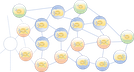
| - | A [[dido:public:ra:xapend:xapend.a_glossary:d:dido]], by definition, is a [dido:public:ra:xapend:xapend.a_glossary:d:distsystem]] comprised of a [[dido:public:ra:xapend:xapend.a_glossary:n:node_network | network]] and a collection of [[dido:public:ra:xapend:xapend.a_glossary:n:node | nodes]] particpating in a [[dido:public:ra:xapend:xapend.a_glossary:p:p2p | Peer to Peer (P2P) network]]. Each node within the DIDO operates asynchronously and independently from all the others nodes. The nodes communicate changes in the state of the distributed objects managed by each nde by publishing [[dido:public:ra:1.2_views:2_tech_views:2-nodenet:3_nodearch:2_ido:2_trans | Transactions]] across the node network. See Figure {{ref>DidoOverview}}. Notice that the DIDO is comprosed of different kinds of Nodes (See [[dido:public:ra:1.2_views:3_taxonomic:3_node_tax]]). | ||
| - | |||
| - | <figure DidoOverview> | ||
| - | {{ dido:public:s_cli:05_contents:02_basics:screen_shot_2021-04-16_at_10.21.09_am.png?700 |}} | ||
| - | <caption>Overview of a DIDO</caption> | ||
| - | </figure> | ||
| - | |||
| - | Any one distributed [[dido:public:ra:1.2_views:2_tech_views:2-nodenet:3_nodearch:2_ido | Immutable DIstributed Data Objects]] can exists on any or all of the kinds of nodes. For example, in Figure {{ref>DidoOverview}}, the Green nodes may represent [[dido:public:ra:1.2_views:2_tech_views:2-nodenet:3_nodearch:2_ido:4_wall | Wallets]] without any distributed objects, while the pink nodes might represent [[dido:public:ra:1.2_views:3_taxonomic:3_node_tax:full:archival | Archival Nodes]] that not only have the distributed objects, but a complete [[dido:public:ra:1.2_views:2_tech_views:2-nodenet:3_nodearch:3_xdata:1_jrnl | journal]] (i.e., ledger) of all the transactions every applied to the distributed object. | ||
| - | |||
| - | One of the most important aspects about a DIDO is that each participating Node in the Node Network using the Distributed Object arrives at the same state for the object given any transaction. In essence, the result of the transaction needs to be deterministic in nature (i.e., the same input (Transaction) achieves the same output (Journal Entry in the Journal). | ||
| - | |||
| - | |||
| - | * [[dido:public:s_cli:05_contents:02_basics:commondef]] | ||
| - | * [[dido:public:s_cli:05_contents:02_basics:commonDef:api]] | ||
| - | * [[dido:public:s_cli:05_contents:02_basics:commonDef:cli]] | ||
| - | * [[dido:public:s_cli:05_contents:02_basics:commondef:platform]] | ||
| - | * [[dido:public:s_cli:05_contents:02_basics:overview:DbStack]] | ||
| - | * [[dido:public:s_cli:05_contents:02_basics:overview:DidoStack]] | ||
| - | |||
| - | |||
| - | |||
| - | |||
| - | |||
| - | |||
| - | |||
| - | |||
| - | ===== Solution Stacks ===== | ||
| - | [[dido:public:s_cli:05_contents:02_basics:02_overview| Return to Top]] | ||
| - | |||
| - | A [[dido:public:ra:xapend:xapend.a_glossary:s:solutionstack]] is an ordered collection of software that makes it possible to complete a particular task. Often a critical part of any stack is the Platform the rest of the stack is built around. Some common platforms are | ||
| - | |||
| - | * Application server Platform | ||
| - | * Web Server Platform | ||
| - | * Storage Platform | ||
| - | * Virtualization Platform | ||
| - | |||
| - | In this case we are particularly interested in building an idealized DIDO Stack with an idealized DIDO Platform. The idealized stack may not be completely accurate for all DIDOs, however, it provides a normative structure of what the pieces are in a DIDO Stack and in a DIDO Platform and how they are interrelated. | ||
| - | |||
| - | To accomplish this, a Database stack is presented with some idealized paths through the stack to met certain user scenarios. Then the DIDO Stack is presented as a transform of the Database Stack. | ||
| - | |||
| - | |||
| - | |||
| - | |||
| - | ==== Database Solution Stack ==== | ||
| - | [[dido:public:s_cli:05_contents:02_basics:02_overview| Return to Top]] | ||
| - | |||
| - | At the heart of Database Solution Stack is a Database Platform. In this case the Database platform is one of the many RDBMS products, such as Oracle, PostgreSQL, MySQL, SQLServer etc. However, in this stack, the DBMS does not necessarily need to be an RDBMS as long as there is an interface to the database that uses SQL. The Boundaries of the Database Platform are not rigid. For example, Microsoft offers a single ODBC interface for many databases, consequently the ODBC driver may or may not be part of the Database Platform. However, in the big picture what is in the Platform and what is not in the platform is a bit pedantic. | ||
| - | |||
| - | |||
| - | |||
| - | <figure> | ||
| - | {{ dido:public:s_cli:05_contents:02_basics:screen_shot_2021-04-19_at_4.32.44_pm.png?500 |}} | ||
| - | <caption>Typical Mature Database "stack"</caption> | ||
| - | </figure> | ||
| - | |||
| - | The following is a brief description of each component in the DBMS Stack. Note, these components are normative in nature and each DBMS may be slightly different. On the left side of the diagram there is a key that describes which tier each component is generally found in. | ||
| - | |||
| - | * **Application** - The application is the application, program, utility, service or microservice that needs to interact with the RDBMS. This is done using standardized Data Definition Language (DDL) or Data Manipulation Language textual commands that adhere to the SQL specifications See: [[dido:public:ra:xapend:xapend.b_stds:tech:iso:dblang-sql-part1]] and related specifications. | ||
| - | * **Users** - And end user can enter SQL compliant DDL or DML text commands into a terminal or even produce scripts that contain as series of commands that sent to the Open Database Connectivity API for processing. Just as with the Application, these commands need to be compliant with the SQL Standard See: [[dido:public:ra:xapend:xapend.b_stds:tech:iso:dblang-sql-part1]]. | ||
| - | * **Open Database Connectivity API** - This a utility (i.e., usually a library) that the application calls to process the SQL commands and check for validity and verification that the commands are correct. Examples of an Open Database Connectivity. See [[dido:public:ra:xapend:xapend.a_glossary:o:odbc]] and [[dido:public:ra:xapend:xapend.a_glossary:j:jdbc]]. | ||
| - | * **Data Definition Language (DDL)** - The [[dido:public:ra:xapend:xapend.a_glossary:d:ddl]] is used to create and modify the structure of database objects in a database. These database objects include views, schemas, tables, indexes, etc. Often, the DDL commands require a differen set of privileges than the Data Manipulation Language (DML). | ||
| - | * **Data Manipulation Language (DML)** - The [[dido:public:ra:xapend:xapend.a_glossary:d:dml]] includes commands permitting users to manipulate data in a database. This manipulation involves inserting data into database tables, retrieving existing data, deleting data from existing tables, modifying existing data and associated data from different tables together. DML is mostly incorporated in SQL databases. | ||
| - | * **DBMS Drivers** - [[dido:public:ra:xapend:xapend.a_glossary:d:dbdriver]] is s a computer program that implements a protocol ([[dido:public:ra:xapend:xapend.a_glossary:o:odbc]] or [[dido:public:ra:xapend:xapend.a_glossary:j:jdbc]]) for a database connection. | ||
| - | * **Database Management System** - [[dido:public:ra:xapend:xapend.a_glossary:d:dbms]] is a software package designed to define, manipulate, retrieve and manage data in a database. A DBMS generally manipulates the data itself, the data format, field names, record structure and file structure. It also defines rules to validate and manipulate this data. | ||
| - | * **SQL Command Line Interpreter (CLI)** - The SQL Command Line Interpreter translates the tokenized SQL commands into DB Specific instructions. | ||
| - | * **Database API** - DBMSs generally support APIs that allow a programmer to directly access a databases. For example, Oracle provides a Oracle C++ Call Innterface (OCCI) [[https://docs.oracle.com/en/database/oracle/oracle-database/18/adobj/oracle-c-cpp-call-interface-odci.html]]. PostgreSQL supports libpq++ as the C++ API to Postgres [[https://www.postgresql.org/docs/7.0/libpqplusplus.htm]] | ||
| - | * **DB Configuration** - There are always two aspects to configuring a DBMS. The first is setting up the environment externally to the DBMS (i.e., downloading the software, running a wizard to install and configure the DB, etc). | ||
| - | * **Data Definition** - A [[dido:public:ra:xapend:xapend.a_glossary:d:ddl]] is a computer language used to create and modify the structure of database objects in a database. These database objects include views, schemas, tables, indexes, etc. | ||
| - | * **Data Manipulation** - A [[dido:public:ra:xapend:xapend.a_glossary:d:dml]] is a family of computer languages including commands permitting users to manipulate data in a database. This manipulation involves inserting data into database tables, retrieving existing data, deleting data from existing tables and modifying existing data. DML is mostly incorporated in SQL databases. | ||
| - | * **Datastore** - A data store is a repository for persistently storing and managing collections of data which include not just repositories like databases, but also simpler store types such as simple files, emails etc. ... A database is a series of bytes that is managed by a database management system (DBMS).[[https://en.wikipedia.org/wiki/Data_store]] | ||
| - | |||
| - | ==== Database Solution Stack Scenarios ==== | ||
| - | [[dido:public:s_cli:05_contents:02_basics:02_overview| Return to Top]] | ||
| - | Figure {{ref>DbScenarios}} represents three different scenarios of interactions of Applications or Users to the Database Solution Stack. | ||
| - | |||
| - | <figure DbScenarios> | ||
| - | {{ dido:public:s_cli:05_contents:02_basics:screen_shot_2021-04-19_at_4.42.12_pm.png?500 |}} | ||
| - | <caption>Three different User Scenario Paths through the Database Solution Stack.</caption> | ||
| - | </figure> | ||
| - | |||
| - | === Scenario #1 === | ||
| - | In this scenario, the Application accesses the Database [[dido:public:ra:xapend:xapend.a_glossary:p:platform]] using the Database provided API. This solution is very machine resource efficient since the Application uses code that is optimized to access a specific Database (i.e., Oracle, PostgreSQL, MySQL, SQLServer, etc.). However, all of the error recovery and testing for the code and any changes made to the underlying database schema rests on the application. | ||
| - | |||
| - | **Note:** This scenario makes it more difficult to migrate from one Database [[dido:public:ra:xapend:xapend.a_glossary:p:platform]] to another (sometimes referred to as vendor lock-in). In order to access the Database, the end user must use the Application. | ||
| - | |||
| - | === Scenario #2 === | ||
| - | In this scenarios, an Application or the End User can create SQL Statements as strings and pass them through [[dido:public:ra:xapend:xapend.a_glossary:o:odbc]] or [[dido:public:ra:xapend:xapend.a_glossary:j:jdbc]] to access the database. In this scenario, the application or the End User are accessing the Database to invoke [[dido:public:ra:xapend:xapend.a_glossary:d:ddl]] functionality for creating, destroying or modifying the database objects defined in the schema (i.e., views, schemas, tables, indexes, etc.). | ||
| - | |||
| - | **Note:** This Scenario usually relies on a specific [[dido:public:ra:xapend:xapend.a_glossary:d:dbdriver]] to access the Database [[dido:public:ra:xapend:xapend.a_glossary:p:platform]] (i.e., a Driver for Oracle, PostgreSQL, MySQL, SQLServer, etc.). | ||
| - | |||
| - | === Scenario #3 === | ||
| - | This scenario is very similar to Scenario #2 except this time the Application or End User are using [[dido:public:ra:xapend:xapend.a_glossary:d:dml]] for inserting data into database tables, retrieving existing data, deleting data from existing tables and modifying existing data. | ||
| - | |||
| - | **Note:** This Scenario usually relies on a database [[dido:public:ra:xapend:xapend.a_glossary:d:dbdriver]] specific to access the Database [[dido:public:ra:xapend:xapend.a_glossary:p:platform]] (i.e., a Driver for Oracle, PostgreSQL, MySQL, SQLServer, etc.). | ||
| - | |||
| - | |||
| - | |||
| - | ==== Proposed DIDO Solution Stack ==== | ||
| - | [[dido:public:s_cli:05_contents:02_basics:02_overview| Return to Top]]' | ||
| - | |||
| - | The proposed DIDO Solution Stack is modeled after the [[dido:public:s_cli:05_contents:02_basics:02_overview| Database Solution Stack]]. The core features of both stacks is persistent storage of data and the modification of data using [[dido:public:ra:1.2_views:2_tech_views:2-nodenet:3_nodearch:2_ido:2_trans | Transaction]]. The major difference is that the DIDO data objects Transactions are journaled with each Transaction being distributed to all the nodes in the node network. The details about how the Transactions are bundled, validated and verified vary amongst DIDO platforms. For example, some platforms bundle the Transactions into a block and the block is distributed once it has been verified by a mining operation. Others use "neighboring" nodes to valid and verify the Transactions. | ||
| - | |||
| - | <figure> | ||
| - | {{ dido:public:s_cli:05_contents:02_basics:screen_shot_2021-04-22_at_9.41.42_am.png?600 |}} | ||
| - | <caption>Proposed DIDO Management "stack"</caption> | ||
| - | </figure> | ||
| - | |||
| - | The following is a brief description of each component in the DIDO Stack. Note, these components are normative in nature and each DIDO may be slightly different. On the left side of the diagram there the components that are good candidates for inclusion into the DIDO platform are identified. | ||
| - | |||
| - | * **Application** - The Application is similar to the Application in the Database Solution Stack, is the application, program, utility, service or microservice that needs to interact with the DIDO. This is done using standardized DIDO Data Definition Language (DDDL) or Data Manipulation Language (DDML) using textual commands that adhere to the DIDO-CLI specifications See: [[dido:public:ra:xapend:xapend.b_stds:tech:iso:dblang-sql-part1]] and related specifications. | ||
| - | * **Users** - And end user can enter DIDO compliant DDDL or DDML text commands into a terminal or even produce scripts that contain a series of commands that sent to the Open DIDO Connectivity API (ODAPI)for processing. Just as with the Application, these commands need to be compliant with the proposed Standard See: [[dido:public:s_cli:05_contents:04_dll]], [[dido:public:s_cli:05_contents:06_dddl]], and [[dido:public:s_cli:05_contents:09_dml]]. | ||
| - | * **Open DIDO Connectivity API (Open DIDO Data Binary Connectivity Layer (ODDBCL)** - This a utility (i.e., usually a library) that the application calls to process the DIDO-CLI commands and check for validity and verification that the commands are correct. | ||
| - | * **DIDO Data Definition Language (DDDL)** - The DIDO Data Definition Language (DDDL) is used to create and modify the structure of DIDO objects in a DIDO. These DIDO objects include Types, objects, oracles, exchanges, aggregates, and smart contracts, etc. Often, the DDDL commands require a different set of privileges than the DIDO Data Manipulation Language (DDML). | ||
| - | * **DIDO Data Manipulation Language (DDML)** - The DIDO Data Manipulation Language (DDML) includes commands permitting users to manipulate (i.e., read) data in a DIDO. Note, the Data in the DIDO is immutable. This manipulation involves inserting data into DIDO Objects, making for deletion objects, creating a Transaction to update the objects and associated data from different objects together. | ||
| - | * **DIDO Drivers** - The DIDO [[dido:public:ra:xapend:xapend.a_glossary:d:dbdriver | Drivers ]] are computer programs that implements a protocol (i.e., ODDBCL) for a DIDO connection. | ||
| - | * **DIDO Data Management System (DDMS) ** - The DIDO Data Management System is a software package designed to define, manipulate, retrieve and manage DIDO Objects in a DIDO. A DIDO generally manipulates the objects itself, the object format, field names, object structure. It also defines rules to validate and manipulate this data. | ||
| - | * **DIDO Data Command Line Interpreter (DDCLI)** - The Command Line Interpreter translates the tokenized DIDO commands into DIDO Platform Specific instructions. | ||
| - | * **DIDO Platform CLI** - Sme DIDO platforms offer their own proprietary CLI. There have been efforts to "re-use" a particular DIDO Platform CLI on different Platforms. | ||
| - | * **DIDO API** - Many DIDO Platforms provide APIs allowing a programmer to directly access a DIDO. For example, Ethereum provides a __Javascript API Libraures__, [[https://ethereum.org/en/developers/docs/apis/javascript/]] or __Ethereum JSON RPC__, [[https://ethereumbuilders.gitbooks.io/guide/content/en/ethereum_json_rpc.html]]. | ||
| - | * **DIDO Configuration** - There are always two aspects to configuring a DIDO. The first is setting up the environment externally to the DIDO Platform (i.e., downloading the software, running a wizard to install and configure the DIDO, etc), the second is the startup, upgrade, shutdown, etc of the DIDO Platform. | ||
| - | * **DIDO Data Definition** - A DIDO provides a way to define Types, objects, oracles, exchanges, aggregates, and smart contracts, etc. to the DIDO. | ||
| - | * **DIDO Data Manipulation** - A DIDO provides a way to manipulate the inserting data into DIDO Objects, making for deletion objects, creating a Transaction to update the objects and associated data from different objects together. | ||
| - | * **DIDO Datastore** - A data store is the actually distributed data held within the DIDO (i.e., the data itself). To store the data in the Datastore, a transaction is created that can make the desired change. Depending on the DIDO Platform, the methodology for verifying and validating the transaction varies. Once it has been valdated and verified, the transaction is propagated to all the [[dido:public:ra:xapend:xapend.a_glossary:n:node]] in the [[dido:public:ra:xapend:xapend.a_glossary:n:node_network]]. | ||
| - | |||
| - | |||
| - | ==== Proposed DIDO Solution Stack Scenarios ==== | ||
| - | [[dido:public:s_cli:05_contents:02_basics:02_overview| Return to Top]] | ||
| - | |||
| - | <figure> | ||
| - | {{ dido:public:s_cli:05_contents:02_basics:screen_shot_2021-04-22_at_9.48.36_am.png?700 |}} | ||
| - | <caption>Three different User Scenario Paths through the DIDO Solution Stack.</caption> | ||
| - | </figure> | ||
| - | |||
| - | === Scenario #1 === | ||
| - | This is currently the path used by most DIDOs.The [[dido:public:ra:xapend:xapend.a_glossary:d:dido_platform]] provides an [[dido:public:ra:xapend:xapend.a_glossary:a:api]] that an Applications can be use to access the DIDO Data Store. These APIs are proprietary in nature and although there are attempts to "re-use" one proprietary API specification on another proprietary platform (interchangeable implementations) it has met with limited success. Also, there are disagreements as to what languages the API should be written in (or support). For example, if the API is written in C, many languages have a way of accessing these function. For examplem Java can ue wither the Java Native Interface (JNI) or the Java Native Access (JNA)(( | ||
| - | Yigit Pirildak, | ||
| - | GetConnected, | ||
| - | 18 March 2020, | ||
| - | Accessed 22 April 2021, | ||
| - | [[https://levelup.gitconnected.com/java-native-access-a-cleaner-alternative-to-jni-954b53b77398]] | ||
| - | )). | ||
| - | |||
| - | Another issues is whether t use the [[dido:public:ra:xapend:xapend.a_glossary:s:static_library]] and [[dido:public:ra:xapend:xapend.a_glossary:s:shared_libraries]] approach. | ||
| - | There advantages and disadvantages provided in Table {{ref>LibDif}}(( | ||
| - | GeeksForGeeks, | ||
| - | 25 October 2018, | ||
| - | Accessed: 22 April 2021, | ||
| - | [[https://www.geeksforgeeks.org/difference-between-static-and-shared-libraries/]] | ||
| - | )). | ||
| - | |||
| - | <table LibDif> | ||
| - | <caption>The Advanatages and Disadvantages to STatic or Shared Libraries.</caption> | ||
| - | ^ Properties ^ [[dido:public:ra:xapend:xapend.a_glossary:s:static_library]] ^ [[dido:public:ra:xapend:xapend.a_glossary:s:shared_libraries]] ^ | ||
| - | ^ Linking time | It happens as the last step of the compilation process. After the program is placed in the memory | Shared libraries are added during linking process when executable file and libraries are added to the memory. | | ||
| - | ^ Means | Performed by linkers | Performed by operating System | | ||
| - | ^ Size | Static libraries are much bigger in size, because external programs are built in the executable file. | Dynamic libraries are much smaller, because there is only one copy of dynamic library that is kept in memory. | | ||
| - | ^ External file changes | Executable file will have to be recompiled if any changes were applied to external files. | In shared libraries, no need to recompile the executable. | | ||
| - | ^ Time | Takes longer to execute, because loading into the memory happens every time while executing. | It is faster because shared library code is already in the memory. | | ||
| - | ^ Compatibility | Never has compatibility issue, since all code is in one executable module. | Programs are dependent on having a compatible library. Dependent program will not work if library gets removed from the system. | | ||
| - | </table> | ||
| - | |||
| - | Note: One of the goals for DIDOs is to minimize the side effects that can arise in distributed objects. Remember, each transactions when applied to any node should result in the same output. There is no guarantee that distributed object will be deterministic if there is __**"no need to recompile the executable"**__ when new libraries are downloaded on different [[dido:public:ra:xapend:xapend.a_glossary:n:node | Nodes]]. This is particularly a problem on Nodes that host other software which may download different versions of the shared library. Furthermore, each component must be deterministic in its behavior, meaning that given the same set of inputs, the outputs will always be the same. In other words, not only will all the same implementations (i.e., configurations) of a node produce the same output, but multiple implementations of a component within a node will provide the same results given the same inputs. | ||
| - | |||
| - | === Scenario #2 === | ||
| - | |||
| - | Naturally, many of these APIs are focused on [[dido:public:ra:xapend:xapend.a_glossary:r:rest]] over [[dido:public:ra:xapend:xapend.a_glossary:h:http]] types of interfaces that define the standardized set of actions or verbs (i.e., GET, POST, PUT, DELETE, PATCH) as part of the [[dido:public:ra:xapend:xapend.a_glossary:h:http_request]] of what needs to be done, not the actual "what" needs to be acted upon. The what is usually sent along as a standardized document (payload) as [[dido:public:ra:xapend:xapend.b_stds:tech:w3c:xml | Extensible Markup Language (XML) ]] or [[dido:public:ra:xapend:xapend.b_stds:tech:ietf:json | JSON]]. also, sometimes the HTTP Request Header is used to send information to the service. The Header is a set of key-value pairs with no standardization as the what keys are to be returned nor what the values are. | ||
| - | |||
| - | There is a similar problem with the [[dido:public:ra:xapend:xapend.a_glossary:h:http_response]]. Although the document (payload) that is returned is in a standardized XML or JSON format, the contents of the document are not standardized. Some HTTP Responses send the results back as part of the HTTP Header which is comprised of non-standardized key-value pairs. | ||
| - | |||
| - | <figure> | ||
| - | {{ dido:public:s_cli:05_contents:02_basics:screen_shot_2021-04-22_at_12.22.58_pm.png?500 |}} | ||
| - | <caption>REST over HTTP</caption> | ||
| - | </figure> | ||
| - | |||
| - | |||
| - | |||
| - | === Scenario #3 === | ||
| - | |||
| - | === Scenario #4 === | ||
| - | |||
| - | |||
| - | /**=-=-=-=-=-=-=-=-=-=-=-=-=-=-=-=-=-=-=-=-=-=-=-=-=-=-=-=-=-=-=-=-=-=-=-=-=-=-=-=-=-=-=-=-=- | ||
| - | /* To add a discussion page to this page, comment out the line that says | ||
| - | ~~DISCUSSION:off~~ | ||
| - | */ | ||
| - | ~~DISCUSSION:on|Outstanding Issues~~ | ||
| - | ~~DISCUSSION:off~~ | ||
dido/public/s_cli/05_contents/02_basics/02_overview.1619811099.txt.gz · Last modified: 2021/04/30 15:31 by nick
